
Want a free, no-commitment audit of your website to check your cookie security?

Introduction
A lot of time is spent on certain security features. For instance, things like password strength, multi-factor authentication and encryption usually dominate the discussion. And for good reason; security isn’t optional.
But there is a softer target that attackers go after that don’t receive as much attention as they deserve: Cookies.
Cookies are literally “the keys to the castle.” Well, at least the keys to your account on websites. The data, though tiny, is so important that if an attacker manages to get their hands on it, they don’t need your username or password. Once your session cookie is compromised, they can enter the site assuming your identity. And that is why cookies are highly coveted and what makes them such an attractive target.
When you operate a website, the burden to keep your visitors safe falls on you. Your users expect the sensitive data they’ve shared with you to remain private and protected.
Knowing that sensitive data can be stored inside of cookies, things like session IDs and tokens used for authentication, it makes sense to secure cookies in order to protect this potential fragile link in your security chain, right?
In this article, we will cover what cookies are and why protecting them is vital to the privacy and security of your users. We’re also going to cover the three attributes a developer should use when dropping cookies in order to secure them and keep as safe as possible.
What are HTTP Cookies
Before we get into what cookies are, some background context will be helpful to fully understand their purpose.
HTTP is a stateless protocol. Here “stateless protocol” is a type of communication where every request to a server is treated as a separate transaction, with absolutely no memory of who requested those transactions or even who it had interactions with.
Left to its own devices, HTTP forgets your identity between requests faster than a goldfish binging on TikTok videos. Without state, it would be like having to introduce yourself to a receptionist at the doctor’s office at the beginning of every response to their questions.
This stateless limitation made authentication and e-commerce nearly impossible. In e-commerce, as soon as you added an item to the cart and navigated away to another page, the item added would be “lost” when you checked your cart. Not a good user experience, right?
Back in 1994, an engineer at Netscape, Lou Montulli, was looking for a way to work around this limitation of the protocol. Specifically, he was searching for a way to allow users to add items to their shopping carts that would overcome the “memory loss” of the HTTP protocol. He needed a way to store the session state for each user and without burdening the server. Compute and RAM were more expensive back then, so just throwing more hardware at the server was cost prohibitive. Thus the HTTP cookie was born to maintain state.
The HTTP cookie, while newer to web applications, has a much longer and richer history. The inspiration for it’s design stems from the “magic cookies” originating in Unix, which was first documented in 1979.
Magic cookies had a similar purpose – to pass a token or short packet of data between programs that needed to communicate with one another.
From file I/O, to network protocols like NFS and even X Windows (X11), they have leveraged cookies for state.
“What’s the cookie thing?” Great question. Every time you visit a website, like your bank, email provider or social media account, you log in to authenticate to use your account. As we’ve covered, HTTP is stateless, so the issue with the protocol is that the server won’t remember who you are over a series of requests.
When you visit a site, a small piece of data is sent to your browser and then stored on your system. This small piece of data is the infamous HTTP cookie and is the mechanism that allows the web server to “remember” who you are.
State is established by storing a session cookie on your system and is used by the server to identify you. With every request you make to the server, by navigating the site, the browser sends the cookie containing your session value back. This magic of the cookie is the reason you don’t have to re-authenticate every time you make a request.
Primary Uses for Cookies
Cookies have three primary uses:
- Functional: these cookies are necessary for the site to function. This would include session management or cookies that maintain state.
- Preferences: cookies for personalization to improve user experience. Settings like language, theme selection, dashboard widgets and other customizations.
- Behavioral: cookies that use your activity to build a profile. These cookies power analytics, advertising and tracking.
The following reference provides a visual representation of how a cookie is used for session management. Note how the cookie is passed between the web server and browser. First you’ll see the server “dropping” a cookie to the browser. The browser then sends it back with every request.
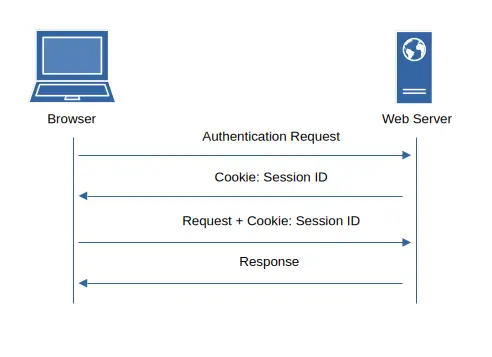
- Browser sends user credentials to authenticate to use the service provided by the web server.
- Server authenticates user and if valid, returns a cookie containing the session ID.
- Browser requests an asset from the server. For example, a page or file passing the cookie with the session ID back to the server.
- The web server will take the cookie and check if the user is authorized to access the asset and sends the appropriate response.
Secure Cookies
Since cookies are responsible for maintaining state, they store data about user sessions, personalization, tracking, and other personal information that needs to remain private between the server and user. As illustrated above in Figure 1, cookies often contain sensitive data. Because of this, cookies are prized by hackers. This is especially true for session cookies.
“Secure cookies” is the practices of protecting HTTP cookies for misuse. Cookies must be protected in your web applications to avoid having them intercepted, tampered with or misused by an attacker. If your application doesn’t secure it’s cookies, your users become rich targets for a slew of nasty attacks. Things like session hijacking, cross-site scripting and cross-site request forgery to name a few.
If an attacker can manage to get their hands on a user’s cookies, then the attacker can impersonate that user or even worse – perform a full takeover of their account. Bad things indeed, yeah?
Security Attributes
There are three attributes that you can set in your web applications to secure cookies and protect your users.
- Secure
- HttpOnly
- SameSite
Secure
Your web sites and applications should be configured to use HTTPS to keep communications encrypted. Cookies sent over HTTPS will protect their content from being read and stolen by man-in-the-middle attacks.
Most web servers are configured to accept HTTP (port 80) requests and then are redirected to HTTPS (port 443). If a user requests the site using the HTTP protocol and the browser sends a cookie header, an attacker could intercept that first insecure request before upgrading the connection to HTTPS.
Since HTTP transmits data in plain text, it is readable by anyone in between server and destination. HTTPS is encrypted, which is what we are after here.
The Secure attribute forces the cookie to be sent back to the server over an encrypted channel using HTTPS, and ensures cookies are never sent with the HTTP protocol. Modern browsers block sites running just HTTP from setting cookies with the Secure attribute for additional protection. The Secure attribute makes it much tougher for an attacker to pull off a man-in-the-middle attack.
Here’s a response that has the Secure attribute set.
Set-Cookie: SESSIONID=950c5ea35d4b472f9b5046ac9; Path=/; SecureNote that if an attacker has access to the system / hard disk or if the HttpOnly attribute isn’t set, then the cookie can still be accessed via JavaScript.
To improve your overall security posture, learn how to force HTTPS connections to your site by setting up a HSTS policy. It’s a quick read that will protect your users from being susceptible to eavesdropping and downgrade attacks.
While the Secure attribute is a great step to keeping your cookies secure, like many things in life, it’s not a 100% fool-proof solution. Its level of protection will depend on what you have set for the HttpOnly attribute, as we’ll discuss next.
HttpOnly
Since cookies are the mechanism used to track state between a browser and web server, Javascript can access your cookies by default. Obviously, allowing Javascript this privilege is not a great idea as it represents a security risk. With everything security related, best to leverage the principle of least privilege.
Cross-site scripting (XSS) is one attack a hacker can wield when not restricting JavaScript from accessing your cookies. XSS is where a hacker injects some JavaScript in a site (comments, posts, etc) that contains malicious code that runs when your visitors browse the infected page(s).
XSS puts your visitors at risk of having their cookies and sessions stolen. Once a hacker has their cookies, they can impersonate the user or take over their accounts. So then how do you protect your users from this attack vector?
HttpOnly is a security attribute to combat XSS attacks. The attribute is set in your cookie headers via the Set-Cookie response header sent by the server. Without HttpOnly, almost any XSS vulnerability becomes much more dangerous because stealing cookies becomes trivial for hackers of any level.
However, when a cookie has the HttpOnly attribute set, the browser prevents any client-side JavaScript from reading or modifying values stored in your cookies.
Note that this attribute is purely a browser-enforced restriction — the server can still read and set the cookie normally. The cookie will still be sent by the browser to the server, which is the typical behavior for any cookie. The major difference is that JavaScript simply cannot access any of your stored cookies from a victim’s browser with the HttpOnly attribute set.
Even if your web developer fails to properly sanitize and escape user input, leaving your site vulnerable to cross-site scripting attacks, an attacker attempting to exploit that vulnerability cannot read cookies protected by the HttpOnly attribute.
The HttpOnly flag instructs the browser to block JavaScript from accessing cookie values. This prevents malicious scripts from stealing session IDs or other sensitive data. This significantly reduces the risk of making your users vulnerable to session hijacking via XSS.
While HttpOnly doesn’t stop the XSS payload from executing or performing other malicious actions, such as making authenticated requests on the victim’s behalf, it does limit some of the most damaging outcomes: direct cookie theft.
And don’t be fooled by the name “HttpOnly” as it has nothing to do with the HTTP protocol. As you learned in the prior section, forcing your cookies to be sent secure with HTTPS is controlled by the Secure attribute.
As mentioned previously, HttpOnly and Secure attributes should be used together. Using independently leaves gaps that impacts their effectiveness. Secure alone doesn’t stop XSS attacks and HttpOnly alone doesn’t prevent plaintext transmission over HTTP. When paired, they offer a good one-two punch to secure cookies.
Set-Cookie: SESSIONID=950c5ea35d4b472f9b5046ac9; Path=/; Secure; HttpOnlySameSite
Another common attack that hackers like to use frequently is called cross-site request forgery (CSRF).
For example, an attacker could craft a malicious link, form, or image tag that submits a request to the server. Because cookies manage state, browsers automatically include cookies with requests. If the victim is logged in and the cookie storing the user’s session ID gets passed back, guess what happens? That’s right, the attacker can now perform an action using the compromised user’s identity, even if they aren’t actually on your site!
This type of attack has some real world consequences. CSFR was widely used to post spam/clickbait to a victim’s social media account, alter profiles by making account modifications or even account deletion!
The SameSite cookie attribute provides site owners and developers control as to when/if cookies are allowed to be sent with cross-site (cross-origin) requests. It acts as a ‘governor’ on a carburetor to restrict third-party access to your cookies. This helps to protect the privacy of your visitors by limiting aggressive cross-site tracking while providing defense from CSRF attacks.
The SameSite attribute can be set to one of three possible values:
- Strict
- Lax (Default)
- None
SameSite=Strict: the cookie can only be sent to requests originating from the cookie’s original domain. Strict is the ideal setting for cookies that are needed for site functionality. For example, cookies that are set after authentication or used for storing shopping cart information.
Strict should be used when you can accept users coming from external links (blog, news, email, Slack, etc.) must log in again for the highest level of security. Strict provides the maximum CSRF protection and used in any situation where security is the number one priority.
SameSite=Lax: cookies can be sent with requests initiated with GET from other domains. Any action that would change the state of the server (POST, PUT, PATCH, DELETE) are not supposed to include cookies. Lax is most useful to maintain usability and mitigate CSRF attacks. They are most commonly used when you are working with a partner website. For example, when working with an affiliate network.
Lax is considered balanced and is the current best-practice default value for cookies. You use Lax when you want users to stay logged in when they follow ordinary links from other sites such as blogs, search results, social media, etc. Because state changing actions are not allowed with Lax, users gain the security benefits without inconvenience of re-authenticating. For this reason, Lax is considered to be the “sweet spot” for most session cookies
SameSite=None: Cookies are sent from originating and cross-site requests. None is useful for requests from third-party content embedded from other sites. Examples would include ads, analytics, etc. One other gotcha – if SameSite is set to “None,” the Secure attribute must be set as well or else the cookie will be rejected by the browser.
While modern browsers default to “Lax” if a value for SameSite is not specified, it is recommend to explicitly set the desired value. At worst, it maintains compatibility with older browsers and makes the intention clear. All it takes is for a practice or standard to change and you’ll have some unexpected code maintenance at 3 AM. Head that off at the pass by explicitly stating the desired value, even if you decide to use “Lax.”
Max-Age and Expiration
Cookies should be set with an expiration date. Just like a cookie you might eat, it should have a shelf life on it for “freshness.”
The only exception to this would be for session cookies. Cookies without a value specified for expires or max-age is best are treated as temporary data. That’s because not including a max-age or expiration ensures the cookie is treated as non-persistent by the browser. This is especially true for session cookies containing data like login sessions and is a recommended best practice for security.
With session cookies being a favorite target of hackers, they should have a relatively short lifespan and be refreshed often to mitigate risks to your users. The timing varies by use case. Financial institutions will have a much shorter duration than cookies set for social media sites.
By not providing an expiration or max-age, when the session ends, for example closing your browser, the cookie is discarded. This practice will minimize the risk of long-term exposure on the client side if the device is compromised or shared like a public computer.
Best Practices for Secure Cookies
We’ve covered a fair amount so far. And if you use the three cookie attributes discussed thus far, it will go a long way to make sure your cookies are secure. But, below is a condensed set of tips and best practices you can use to make sure you tighten your cookie security as much as possible.
- Always use Secure and HttpOnly together. This will give you the best coverage and close gaps that are present when only including one or the other.
- Use the principle of least privilege to restrict cookie access, scope, and lifetime to the minimum necessary for functionality. Doing so reduces the risk of abuse if compromised.
- Store session cookies without a value for Expires or Max-Age to have them treated as temporary data, which will be automatically discarded when the browser is closed.
- Avoid storing sensitive data (e.g., username, passwords, PII) directly in cookies. Even when encrypted, since it is stored on client side and out of your control, it’s just not a good idea.
- Set the Domain and Path attributes to the most restrictive values possible. Doing so will limit cookie scope to only the absolute necessary domains and paths.
- Use __Secure- or __Host- prefixes for cookies to prevent insecure sources from overwriting them.
- Implement additional defenses like Content Security Policy (CSP) to block malicious scripts and anti-CSRF tokens to prevent unauthorized actions.
If you are a developer or just want to learn more about practical implementations, check out Mozilla MDN’s guide on secure cookie configuration for more information.
Conclusion
Your site visitors and users expect that when they visit your site, you will be good stewards of their data and keep their communications secure and private. Proper cookie security is a major principle of web security.
Besides harming your visitors and your company’s reputation, there are regulatory standards that require the secure handling of session data. This is especially true if your cookies could be used to expose personal, health or financial information about your users. Regulations makes secure cookies not only a best practice, but a compliance necessity as well.
When combining secure cookies with HTTPS and Strict Transport Security, it become nearly impossible to leak cookies by “sniffing” or downgrading connections to allow for eavesdropping or man-in-the-middle style attacks.
At the very least, securing your user’s cookies will make it significantly harder for a hacker to get access them.
How is your cookie policy? Would you like a free, no commitment audit of your website to check your cookie security?
Get in touch with us or schedule your free, no-obligation consultation today!