

Introduction
The answer to the question above is a resounding “YES!” if you don’t have Strict-Transport-Security (HSTS) enabled.
Lately, I’ve seen a lot of sites operating without HSTS enabled and I’m not sure have good reason as to why.This is particularly troublesome because setting HSTS up on your site is such a low-effort, high-impact task.
Considering that HSTS strengthens your security posture while building trust with your visitors, it really is a no-brainer that this should be a top priority for you to get squared away ASAP.
In this article, we’ll cover how simple it is to add HTTP Strict-Transport-Security to your site and cover how doing so pays big dividends in protecting your visitors from becoming victims and improving your site’s reputation.
Before diving in deeper and getting caught up in the “technical weeds,” I’ll start off with the basics so everyone has equal footing in what’s at stake for their website’s security.
Read on to learn more about HSTS, how you can test if your site is vulnerable, and most importantly, how to get it corrected.
HSTS: HTTP Strict-Transport-Security
What exactly HTTP Strict-Transport-Security? Better known by it’s abbreviation HSTS, it is a security policy that forces browsers to connect to websites securely with encryption provided by the HTTPS protocol. Think of HSTS as a bouncer presented with a VIP list, controlling who gains entry into a prominent club. Anyone not on the list is denied access.
Websites running HSTS will deny browsers entry into their site if the user isn’t able to connect securely via HTTPS. If the connection is not secure, a response is sent back to the browser informing the user that they need a secure, encrypted connection.
It’s pretty well known that HTTP (Hypertext Transfer Protocol) is not a secure protocol. Data sent over HTTP is not encrypted and is actually transmitted in plain text. Anyone intercepting the traffic can easily read the communication sent between the user’s browser and the web server. With HTTP, sensitive information like passwords, form data, and session cookies are easily compromised.
HTTPS is also synonymous with security, as anyone having made an online purchase should be familiar with the famous padlock icon. The padlock lets you know the connection is secure and provides the confidence to move forward with entering credentials or providing payment details to make an online purchase.
Without going too far down the rabbit hole, HTTPS uses a TLS wrapper to make encryption possible; verifying the the site’s identity and encrypting the communication between the browser and the server.
Since HSTS forces secure, encrypted connections, it prevents some things like eavesdropping, tampering with data during transit and a host of other attacks.
HSTS in a Nutshell
Going back to the analogy of HSTS acting like your site’s bouncer, it forces the HTTPS protocol to connect to the site in order to protect a site’s visitors. It also let’s the browser know that any future requests to access content on your site using HTTP needs to be upgraded to HTTPS before attempting to connect again and for a specified duration. If there are any issues with establishing a secure connection, then everything comes to a screeching halt.
With HSTS enabled, whenever someone visits your site, the web server sends the strict-transport-security directive in the response header with the details of your policy. Once received, HSTS directs the browser to automatically upgrade to HTTPS and to not allow HTTP for any subsequent visits for a period specified.
If a secure connection fails, for example, due to an invalid or expired SSL certificate, then the browser halts loading the page from the site to protect visitors from potentially being exploited. A typical response header for HSTS looks like the following:
Strict-Transport-Security max-age=31536000; includeSubdomains; preloadThe first directive, max-age, represents the amount of time the browser should force HTTPS connections. Note the value is listed in number of seconds. In this example, max-age=31536000, which is the number of seconds in one year.
The second directive, includeSubdomains, is important as it protects subdomains. Since cookies can be manipulated from subdomains, It is recommended to include this directive to provide full coverage for your domain.
Even if you don’t currently have any subdomains, there is no penalty for including it and preferred over omitting it. Plans often change and if added in the future, you are covered when/if that decision is made.
The third directive, preloading, is optional. If present, your site is included in HSTS preload lists. Preload was added to overcome a shortcoming with HSTS that we will cover later. For now, know that if your site is in the preload list, the browser will upgrade the connection to HTTPS before attempting to connect and will not allow HTTP connections period.
Why should you care about HSTS?
So why should you even bother with enabling HSTS on your site? In short, to keep your visitors safe and earn their trust.
If your site handles credentials for logins, payments or any personally identifiable information, then forcing HTTPS is non-negotiable. That information needs to be protected so it really is a must! HTTPS is the De facto standard for traversing the net.
Sites that allow HTTP connections are by definition not secure because everything is transmitted in plain text. There really isn’t a good reason to not force HTTPS connection to protect your site with encryption. If you are only running HTTP, your site would be flagged as a risk to your visitors (“not secure”) leading to trust issues with your visitors.
Any tech savvy user will notice instantly and will go out of their way to avoid using your site. Personally, I would never visit a site that allows HTTP connections. It demonstrates a lack of responsibility, incompetence or both – not being mutually exclusive of course.
If a site owner won’t take basic precautions to protect communications for it’s users with something as obvious as the protocol being used for connections, how good of a job do you think they are doing to protect your data on the back-end? Definitely not a confidence builder.
If keeping your users safe from potential attacks isn’t enough of a reason for you (newsflash, it should!) then how about avoiding a major hit to your SEO efforts? Secure sites running HTTPS can give you the edge to beat out those using HTTP, all things being equal.
Plus, using only HTTPS connections limits the attack surface available to hackers, improving your security posture and making your site less appealing to an attacker. At the very least, it might send them looking for easier target.
The question should be reworded “Why don’t I have HSTS enabled on my site to secure communication with my users?” Having HSTS in place mitigates the risk of potentially bad things happening to your users, so there really isn’t a good reason not to put it to use for your site.
Risks Without HSTS
As discussed earlier, HTTP sends all of its data in plain text, so communication streams can be read by anyone sitting between the connection from browser to the website. Not only will the attacker be able to read everything, but it also provides the opportunity to tamper with the messages, both to and from the browser and site.
While most sites redirect HTTP traffic to HTTPS, which is great to move to a secure channel, there is a downside. The initial HTTP connection leaves your visitors vulnerable. It provides just enough wiggle room for an attacker to set up eavesdropping or some other network related attacks.
One potential attack is SSL Stripping, made famous by Signal creator Moxie Marlinspike. SSL Stripping is where an attacker intercepts a HTTP connection request, prevents the redirect to HTTPS and is able to keep the session unencrypted between the attacker and the user.
An illustration of what this looks like follows:
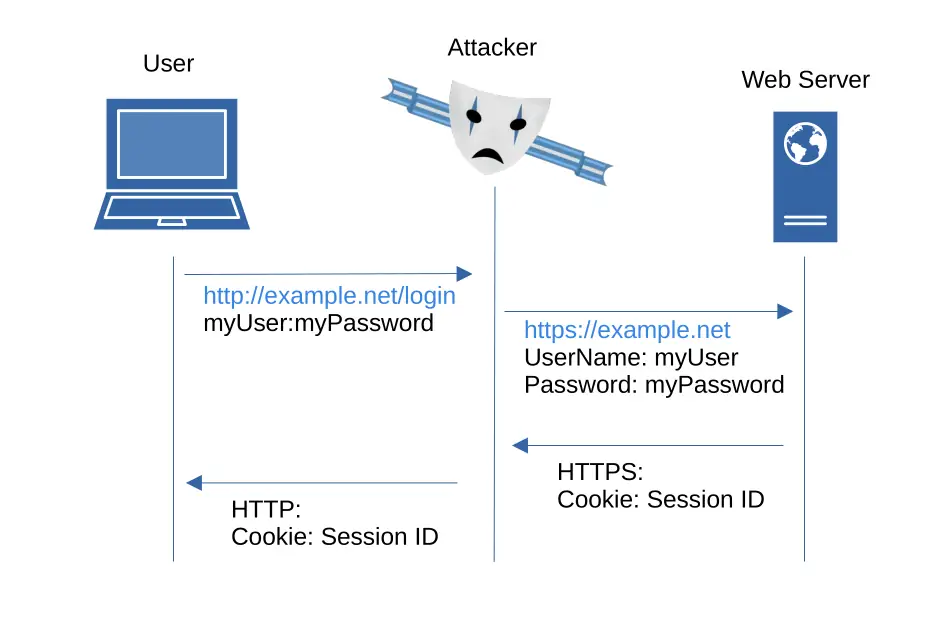
A few examples of the type of attacks your visitors could be vulnerable to without HSTS enabled follows:
Downgrade Attack: this type of attack is where a hacker tricks your users into connecting over HTTP, which is not encrypted. This is the first step to launching more sinister attacks.
Man-in-the-middle (MITM): since the channel is not encrypted (transmitted in plain text), this allows a hacker to intercept sensitive data during transit.
Session Cookie Hijacking: cookies sent over HTTP will definitely get the attention of hackers, leading to your site becoming a prime target. You can learn more about the importance of secure cookies in our post about secure cookies.
Phishing and Spoofing: An attacker can redirect traffic to malicious sites that clone your site to perform additional attacks like stealing credentials to access their account.
But fret not, HSTS to the rescue! This is exactly why it was created. With a HSTS in place, HTTP requests are not allowed, mitigating the risks from the types of attacks previously discussed.
Even if an attacker does try a man-in-the-middle attack (MITM) on your users, HSTS renders most variants ineffective because the channel is encrypted.
By forcing connection over an encrypted channel, the attacker can’t read or manipulate the communication stream. The encryption layer provided by the HTTPS protocol keeps your communications private and protected. The communication between browser and web server is literally indecipherable to anyone without the private key.
If you want a deep dive on SSL Stripping, check out the following YouTube video presented on the topic by the author himself.
How to check your site
Here’s the great part…it doesn’t require much technical knowledge to check the status for yourself. You can check it right now all in your browser.
For example, if you run Chrome or Chromium, use DevTools, and navigate to the Network tool so you see can see what is going on. Instead of using HTTPS to connect, substitute HTTP and monitor the response from the web server.
If the site you are checking is “yourwebsite.ext” – what you’d want to type it into the URL bar follows:
http://yourwebsite.ext If you have HSTS active, you should see a 307, which is an internal redirect. You can also see if the reason was due to HSTS.
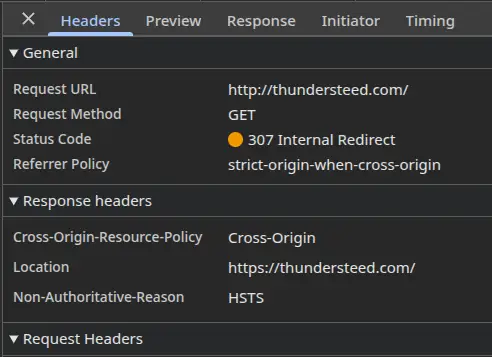
Note that a 307 is an internal redirect, meaning the request never “hits the wire.” No data packets are sent to the server, rather its handled inside your browser so the HTTP request is never made to the server. Rather, the connection is upgraded on the client side by the browser, re-routing your request from HTTP to HTTPS auto-magically.
If you don’t have HSTS enabled and your web server is set up to accept / redirect HTTP requests to HTTPS, then you will see the following sequence:
- 301 (Moved Permanently) redirecting you to HTTPS
- 200 OK once the site loads.
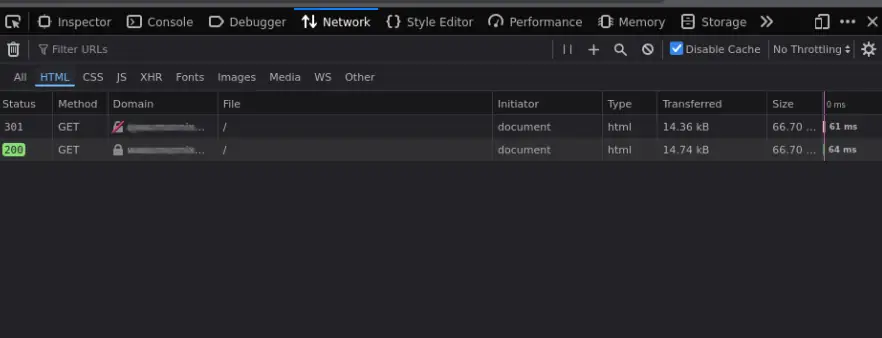
Using a 301 redirect to re-route the traffic from HTTP to HTTPS is good, but as discussed earlier, it is not enough to protect your visitors on that first visit. That’s because the initial connection through HTTP provides a small enough crack to give the hacker an opportunity to turn your visitors into victims with a downgrade attack.
Lighthouse
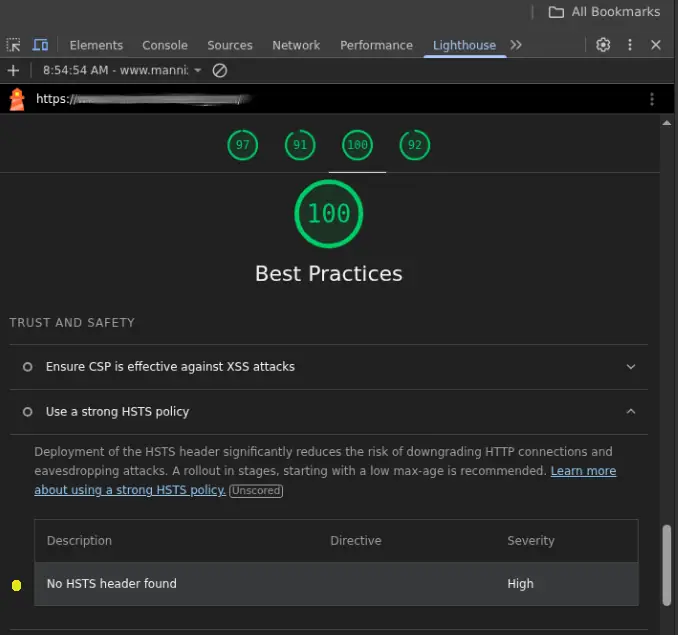
If you don’t want to use Dev Tools to sort through the network trace, an easier way if your are running Chrome or Chromium is to use Lighthouse.
Besides seeing scores on Performance, Accessibility, Best Practices and SEO, you can also check how you rank in TRUST AND SAFETY. This information will be presented under the Best Practices section.
To go this route, open your browser and load up your site. Right click any where in the browser window and choose “Inspect.” Navigate to the Lighthouse tab. You can make selections or leave as default. Once ready, click on the “Analyze page load” button to start generating your report.
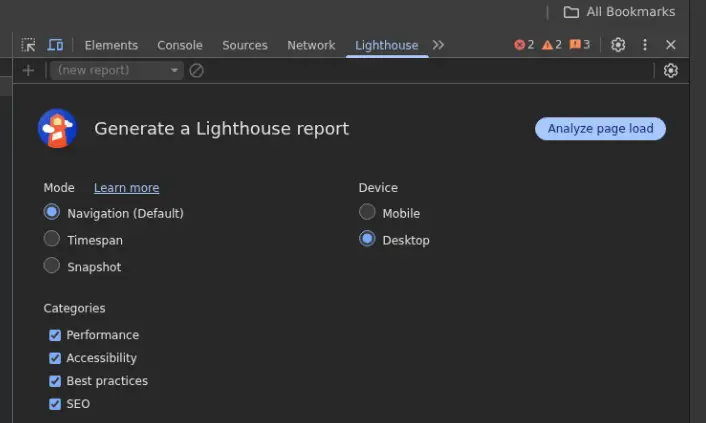
Once the results are in, scroll down to “Best Practices” section and look under “TRUST AND SAFETY” for the results.
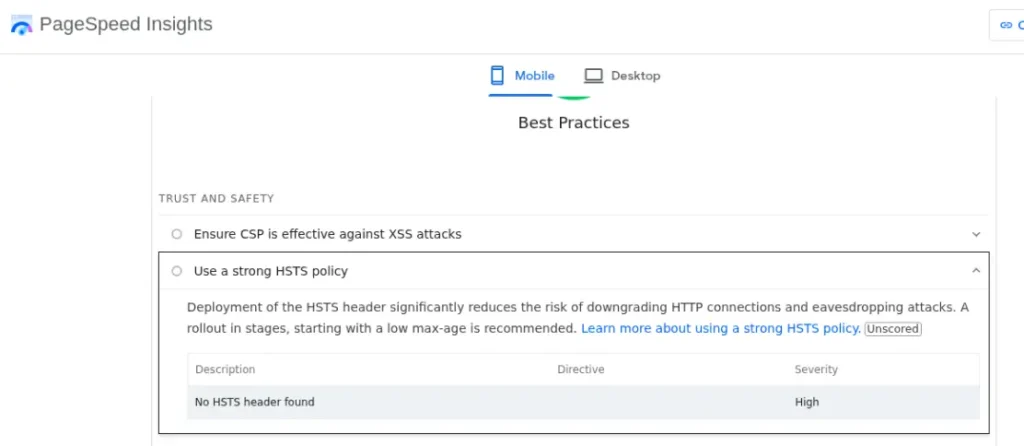
If you see “Use a strong HSTS policy“, then you have some issues, which Lighthouse is more than happy to report. If present, click on the chevron next to “Use a strong HSTS policy” to see more information and recommendations on how to remedy.
If you don’t run Chrome or just want to run it through a website, https://pagespeed.web.dev/ will generate the same report and data points.
Mozilla’s HTTP Observatory
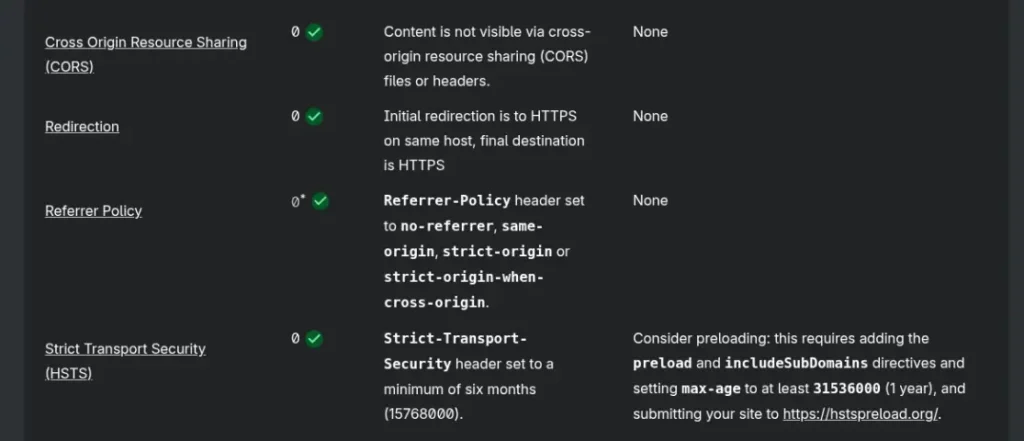
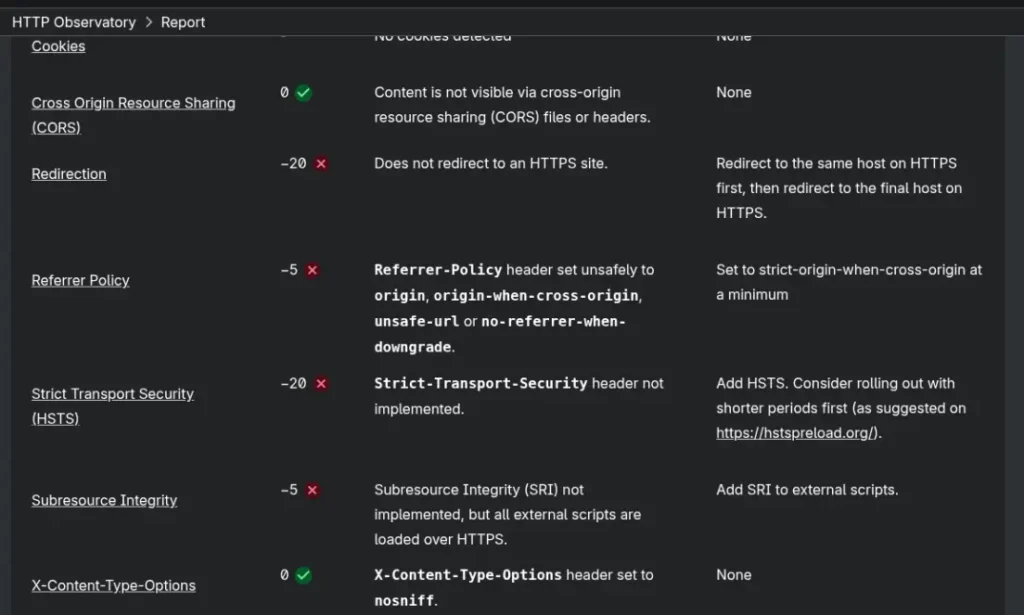
Mozilla’s HTTP Observatory offers a more comprehensive look by doing a deep dive into how compliant your security posture is with current best practices.
Below is what a passing score would look like for HSTS:
And what a failing score looks like:
Command Line
For power users who prefer CLI, if you have curl installed, you can see the headers with the following command:
curl -I https://yourdomain.extOr you can filter the results to just contain the line relevant to HSTS (if present) by piping (|) to grep, to filter for “strict-transport-security.”
curl -I https://yourdomain.ext/ | grep -i strict-transport-securityIf you see a line similar to the following, then congratulations! You have HSTS enabled.
strict-transport-security: max-age=31536000; includeSubDomainsThe exact output could vary depending on what directives are currently set in your policy. For example, you might see different values or even missing directives for max-age, includeSubdomains and preload.
If you don’t see a line containing “strict-transport-security,” then your site doesn’t have a policy and could be at risk for the type of attacks we covered earlier.
Even if you have a policy in place, you may need to adjust some of the values in your directives to optimal values. We’ll cover recommendations for your policy in the next section.
Policy Recommendations
When initially setting up your HSTS policy, avoid going all in at first. If the max-age is set too high and you discover an issue, those who visited your site before the change will have to wait for the full expiration. It is better to start small, making incremental changes over time once you’ve verified your configuration settings work well with your site.
Below are the HSTS directives, followed by recommendations to guide you when you configure your policy.
Max-Age
Longer times are recommended for the max-age directive, so if your current value is less than 6 months, consider increasing it if your site has been thoroughly tested and proven to not require HTTP for any parts of the site, like linking images with HTTP in legacy code.
If you don’t currently have a policy in place, start out with a low max-age. Five minutes (300 seconds) is a good place to start before checking your site for functionality. Once you perform a proper smoke test, work out any issues uncovered, then retest again to ensure your site is fully functional. Once all is good, go ahead and start bumping up the duration.
As far as how much should you consider raising your max-age, the advice here varies. Some advise to move slowly, progressing to an hour, then a day, week, couple of weeks, month, six months then year.
How many iterations you use before making it to the six month / year level really depends on how thorough you’ve been in your testing.
If you are certain you’ve adequately covered everything, you could move it to 3 months, then 6 months and finally increase it to a year or more. Otherwise, increase in smaller increments for the first month to make sure you don’t run into any surprises.
Note that max-age is defined in seconds. If you want a year, it will need to be set to 31536000 to keep the policy enforced for a period of one year.
Include Subdomains
It is recommended to add the includeSubdomains directive to your policy for complete domain protection. Even if you don’t currently have any subdomains or any plans to support in the future, it is still recommended to add as there is no downside to include it in your policy.
Preload
The one weakness in HSTS is that it really doesn’t take effect until the browser has made at least one visit to your site. What this means is that if the first connection to your site by a visitor is made with HTTP, that first request is vulnerable, because it will take the HSTS response from the server to upgrade the connection. That initial request is enough of an opening for an attacker to work their way in. To counter this challenge, the preload directive was added.
The preload indicates to browsers that you want your site baked into their HSTS lists, which will protect against any HTTP connections from the start. Once on the preload list, the browser will upgrade any HTTP requests to HTTPS automatically. This is done client side, before any requests hit the network, so the visitor is not vulnerable.
While preload does address the first connect limitation of HSTS, it must be handled with care. Once you are on the HSTS preload list, only HTTPS connections will be used without any real way for users to bypass. This makes any misconfiguration or certificate issues costly.
Once added to the list, you lose some control here because getting removed from the list requires a third party. Since this is not under your organization’s control as to when it gets resolved, it requires more consideration.
Only consider adding the preload directive after you’ve thoroughly tested your site with max-age and includeSubdomains to ensure your site is ready for only HTTPS connections. And you should also have some means to monitor for expired or certificated issues. More on that in the next section.
Note that in order to use preload, your site’s max-age must be set to at least one year (31536000) with the includeSubdomains directive also set.
SSL Certificates
One word of caution; because you are forcing HTTPS connections with HSTS, you must stay on top of your SSL certificates. Otherwise, browsers will not let your visitors through to your site if any issues arise.
If you let your certs expire, you will experience downtime until corrected. Consider adding automation and monitoring to make sure certificates are renewed in a timely manner and to notify you as soon as possible if something goes awry.
Setting up alerts is something your site needs to be proactive, and is a small price to pay in order to keep your users safe from attacks.
Conclusion
Strict-Transport-Security (HSTS) is a simple but powerful option to increase your site’s security posture and promote trust with visitors. As an added bonus, it takes away an easy win for hackers. With just a little effort, you will boost your company’s security posture and reputation.
By enabling HSTS, you mitigate some risks of allowing your users to be victimized with eavesdropping and downgrade attacks, since it will force the use of secure HTTPS connection. This ensures all communications between your visitors and web server are kept private and protected.
While HSTS does have one weakness, requiring the first connection request to send the policy back to the user, this can be mitigated by using the preload directive. Doing so will ensure your policy is enforced from the start, before any request hits the network and is sent to your server.
Don’t have HSTS enabled or want a second pair of eyes to review your current policy? ThunderSteed can help. We’ll confirm if your site is protected and if not, provide clear actionable actions to close any security gap. And if you don’t want to DIY, we can handle full service too.
Get in touch with us to schedule a free, no-obligation consultation to ensure you have HSTS enabled today.